
Weekly Update: March 27, 2026
The Future?

eXtending my Reality
This week I’ve got a tech review for you. I had been interested in XR glasses for a few years. Recently there have been several notable models released by three of the biggest brands: VITURE, XREAL and RayNeo. RayNeo’s lineup is the least expensive option that offers a lot of “bang for your buck”. I quickly ruled out RayNeo because they are a division of TCL and well, fuck TCL. I will never give them any more of my business!
It came down to choosing between the XREAL 1 Pro, XREAL 1S, VITURE Beast and VITURE Luma Series. The VITURE Beast and XREAL 1S are the two most popular models available at the moment. I would have probably bought the VITURE Beast but the lack of diopter adjustment made me hesitant. Everything I saw regarding XREAL said they were a solid choice, but most reviews suggested VITURE won in a side-by-side comparison in picture quality, color saturation and brightness.
Eyesight degrades as you get older and I would rather not have to add a prescription lens insert if the default configuration didn’t work for me. I started to look at VITURE’s Luma series, which features diopter adjustments. I had pretty much settled on the Luma Ultra. I checked the prices on Amazon and VITURE’s website.
I visited VITURE’s store on the Shop app and saw that they had some great deals. The Luma Pro was on sale for $349, plus there was an extra $55 off and I was also able to apply a promo code for an additional 10% off. I also picked up the VITURE Pro Mobile Dock, because it is needed if I wanted to connect my Switch 2 to the glasses, plus it can also be used to connect the glasses to sources that only have an HDMI out. The glasses and dock ended up being roughly the same price the glasses were on sale for ($349), before the additional $55 & 10% off savings.
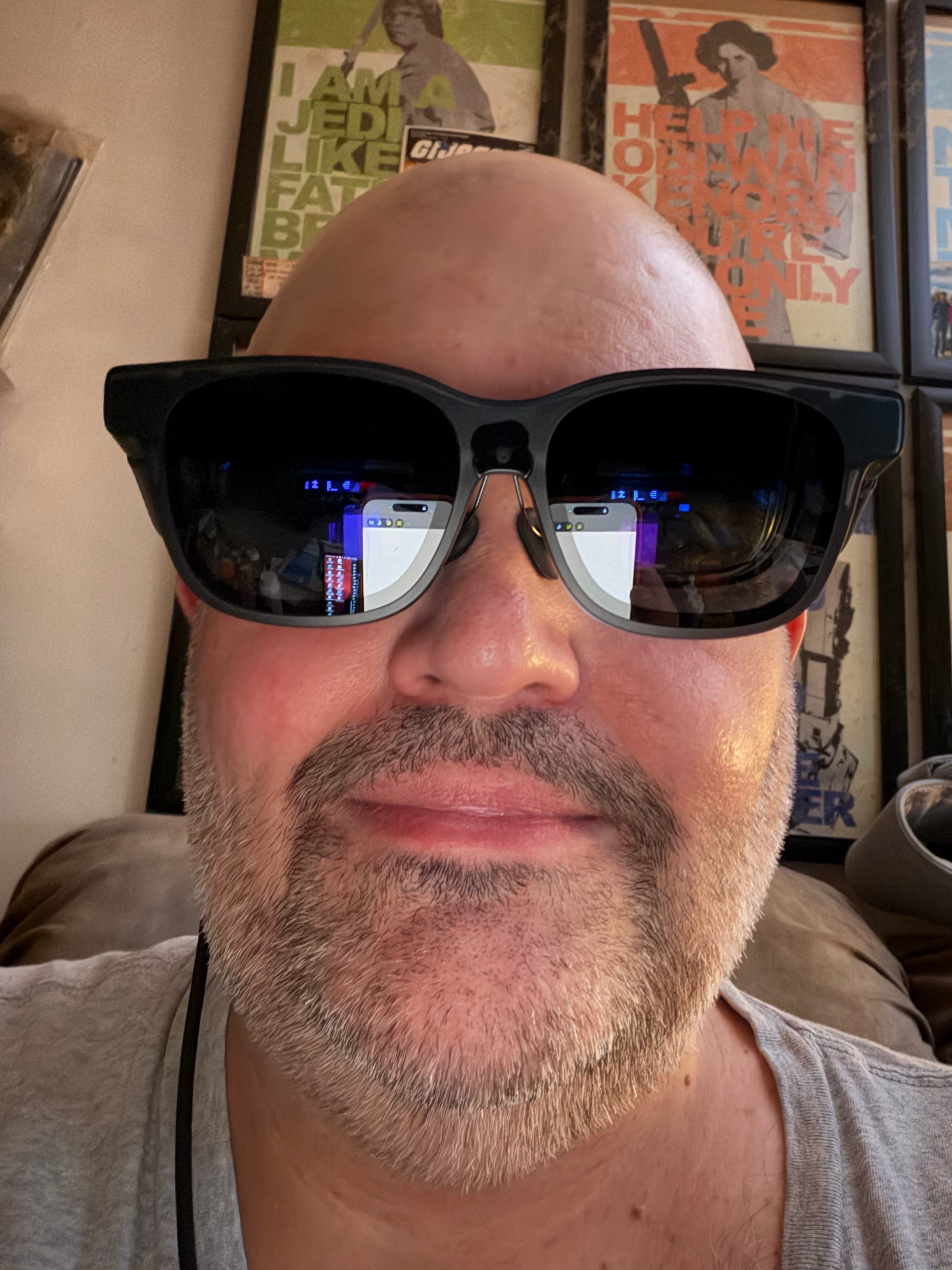
I received my order on Tuesday and the VITURE Luma Pro glasses are pretty much everything that I hoped they would be. Before I give you my impressions, let me tell you what these glasses aren’t. These are not virtual reality goggles like the Meta Quest3 or PlayStation VR. You are not going to get that 360°/6 DoF immersiveness that you would with a VR headset. These are Extended Reality (XR) glasses. It’s like having a large screen portable monitor in a form factor that looks like a pair of sunglasses. There are two 1200p micro OLED screens (one for each eye) inside and it can be used to mirror just about any source that supports video out over USB-C.
My biggest reason for wanting XR glasses is working from home. I WFH 3 days per week. I usually start the day off on my main setup (Mac Studio), where I have dual 24” monitors. Later in the morning I migrate to the living room and work from my MacBook Air the rest of the day. With the laptop being a 13” - the smaller, single screen gets to be a bit tedious and tiring. I will sometimes connect my iPad via Sidecar to act as an extended display (giving me a dual screen setup), but it’s still just two 13” screens. XR glasses seemed to be the perfect solution to my want of a larger display for working from my laptop.
XREAL’s 1 Pro, 1S and VITURE Beast feature a specialized chipset that packs a lot of the glasses main features into the hardware. The Luma series relies on VITURE’s SpaceWalker and Immersive 3D apps to do the heavy lifting. It was a compromise that I was OK with since I’ve heard that the XREAL glasses and Beast can get uncomfortably warm due to the onboard processing. Anyways, I have mainly been using my Luma Pro glasses with my MacBook Air and it’s absolutely perfect for my needs. I set the SpaceWalker app to a side-by-side dual screen setup. I have the left “monitor” in front of me. I look to the right and there is the second “monitor”.
While VITURE claims the screens can appear to be as a large as 152” with 52° field of view, I personally keep the displays set at a distance that makes the screen appear to be around the size of an 80” TV. There are some compromises on quality. The screens are 1200p (which is essentially 1080p at an ultrawide 16:10 aspect ratio). This means you are not going to get the benefit of 4K resolution, but they do look great regardless.
I think the biggest downside is the loss of HDR. RayNeo’s newest glasses claim to be the first XR glasses on the market to support HDR, but once again: fuck TCL!
I will say that the Luma Pro’s colors are vibrant and the 1,000 nits of brightness keep things looking lively. VITURE’s 2D to 3D conversion works pretty well and can be downright impressive at times. While I would prefer HDR over the “ViewMaster” look that you get with modern 3D, it almost makes up for the lack of HDR support IMHO. The SpaceWalker app for mobile & tablets (iOS/iPadOS in my case) includes the 3D conversion features integrated, but for desktops you will need the separate “Immersive 3D” app.
There are pros and cons to using SpaceWalker. On phones and tablets, SpaceWalker acts as a dashboard of sorts. It’s web-based and only certain platforms are supported in SpaceWalker mobile, which is required to take advantage of the “immersive 3D” feature. Outside of SpaceWalker you can mirror your phone or tablet to the glasses and use whatever apps you want, but you will lose the ability to convert that content to 3D.
To get the most out of the SpaceWalker experience on mobile devices, you will need to purchase VITURE’s USB-C charging adapter for phones/tablets. There are two models available. One for iPhone/iPad with USB-C and one for non-Apple devices with USB-C. I ended up ordering one from Amazon yesterday and briefly tried it out earlier this morning. It works, but I have no idea what features it unlocked. All I know is the message I saw saying that this attachment was needed to use certain features is no longer there.
On desktop SpaceWalker allows for more freedom. You can choose 2 and 3 multi-display setups which comes in a few different options (side-by-side, vertically stacked, landscape-portrait-landscape, etc.) and it acts just like a single or multiple monitor setup. The Immersive 3D app for desktop machines allows you convert everything to 3D, but it needs to be run separately from SpaceWalker and both apps can’t be used at the same time. This means some of the fine tuning (like screen distance) that you have set in SpaceWalker will return to the default setting (which I would estimate makes the screen look to be roughly 100”). Not a deal-breaker, but it is slightly disappointing that the 3D app doesn’t at least include these options.
VITURE’s XR glasses feature built-in audio by Harman. The speakers are inside of the arms of the glasses and sit just above the ear, firing downward. The sound won’t blow you away, but the audio is well-balanced and crystal clear. The speakers are close enough to the ear that you can set the sound to the second or third lowest option and hear it as clear as day in a quiet environment. The open air design means that anyone near you will be able to hear the audio of whatever you are watching/listening to while wearing the glasses. In louder environments, I would suggest using headphones.
The Luma Pro are powered by the device it is connected to via a USB-C cable. If the device doesn’t provide power you will need the VITURE Pro Mobile Dock, which also acts as an external battery to power the glasses and also charge a gaming handled like a Nintendo Switch 1/2 or a Steam Deck while using it with the glasses.
Wearing XR glasses you are tethered to an external device at all times (phone, tablet, computer, gaming device, Mobile Dock, etc.). You get used to it though. Note: The dock is needed in order to connect a Nintendo Switch 2 to the glasses. I tried it out and it works, though the drop in resolution from 2160p to 1080p and the lack of HDR is noticeable. Gaming with the glasses would be great if you travel, but at home I would rather have the full 4K/HDR experience.
The glasses feature electrochromic film tint. With it turned off, the glasses will become transparent enough to make it look like a pair of dark tinted sunglasses. With it turned on, it reduces transparency to about 20%. The OLED displays in the glasses can also be turned off when not in use - so in theory you could probably wear these as sunglasses. I wouldn’t, but you probably could. VITURE also sells a physical lens shade that can be attached to the front of the glasses to block out even more light if you find the electrochomic tint isn’t strong enough for you.
VITURE provides 3 sets of nosepads (small, medium and large). The pads are connected to a wire frame, which attach to the glasses magnetically. You can swap the nosepads to find the right fit for you. The arms of the glasses are also adjustable to further customize your fit. Just above each eye is a dial to adjust the diopter to correct for nearsightedness up to -4.0D myopia. The glasses also come with a nice carrying case, the USB-C cable, a cleaning cloth and some stickers to black out the onboard front-facing camera, which sits just above the nose area.
I haven’t used the camera. I haven’t seen any options in SpaceWalker or the onboard menus for the camera. It’s possible camera features will be unlocked in a future firmware update. I really don’t know. I have read that the camera can be used to shoot video, live-streaming, and for AR-type stuff like a HUD and navigation. As far as I can tell camera features are not accessible yet.
VITURE also sells an accessory called the Pro Neckband, which is supposed to be able to bring a spacial computing experience to their lineup of XR glasses. I’m intrigued, but it would take a lot of convincing to get me to spend nearly $400 on an Android-based “computing” system.
Overall, I’m happy with VITURE’s Luma Pro XR glasses. Limitations of the SpaceWalker software aside, they do the exact job that I specifically wanted them for. This technology is developing quickly and XR glasses seem to be gaining momentum. I’m glad that I got a great deal on the Luma Pro and ended up saving $200-$250 that would have gone to the Beast or Luma Ultra. It was still a bit pricey and the tech is rapidly evolving at a pace where the next gen of XR glasses will start hitting store shelves over the next few months. I think the technology has reached a point where it has become reliable enough to perform certain tasks very well.
RSE Freestyle Radio
Another unremarkable week for new releases.

Wrapping Things Up
Freestyle is a shitshow. This week we saw a respected DJ / Producer / Remixer Peter Serrano (PJ Sera) call out Eugene “Yuyo MC DaWizard” Rivera for his notoriously bad behavior. He’s been bullying and threatening people online for years now. Glad to see someone is finally stepping up to Freestyle’s grand Juggalo for his internet thuggery.
Continuing their commitment to destroying whatever is left of the genre: 418 Freestyle dropped another AI release today by the artist “Cantina Dwellas”. Funny they didn’t even bother to slap their obnoxious logo on the cover of this 💩!
Thanks for reading. Thanks for listening and thank you for your support!
Until next week… Take care.
- Brad Warsaw